
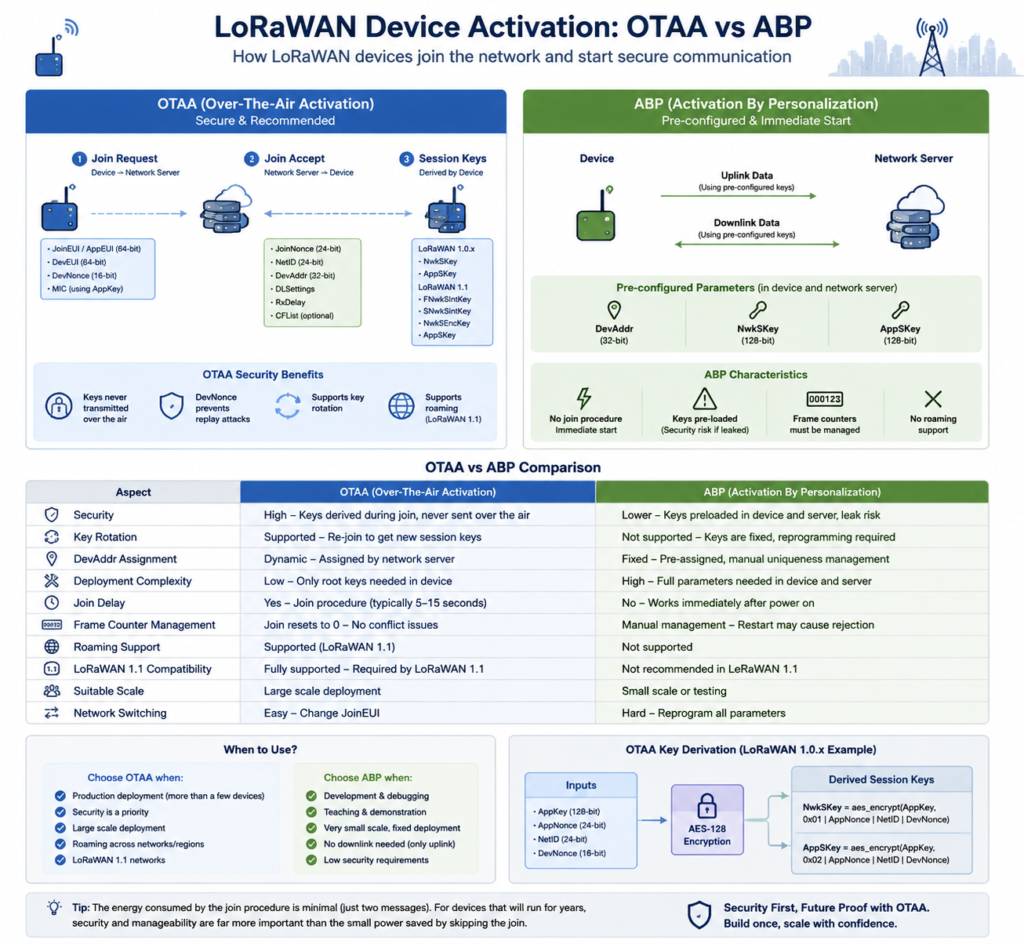
Before a LoRaWAN device can send or receive any data, it must complete a process called activation — the step where the device obtains its network address and session keys. The activation method you choose affects security, deployment complexity, and day-to-day operations.
The LoRaWAN specification defines two activation methods: OTAA (Over-The-Air Activation) and ABP (Activation By Personalization). This article breaks down how each works, compares them side by side, and gives practical selection guidance.
OTAA: Over-The-Air Activation
OTAA is the recommended activation method. Devices ship without session keys and complete authentication over the air after the first power-up.
How It Works
OTAA activation happens in three steps:
1. The device sends a Join Request
The device transmits a Join Request carrying:
| Field | Description |
| JoinEUI / AppEUI | Application identifier (64-bit) that selects the application or network server to join |
| DevEUI | Globally unique device identifier (64-bit), typically derived from the hardware MAC or programmed at manufacture |
| DevNonce | A random number (16-bit) that increments on every Join Request, preventing replay attacks |
The Join Request is authenticated with a MIC (Message Integrity Code) computed using the AppKey, ensuring the message was not tampered with.
2. The network server validates and sends a Join Accept
On receiving the Join Request, the network server:
- Looks up the device’s AppKey (and NwkKey on LoRaWAN 1.1) by JoinEUI/AppEUI
- Verifies the MIC to confirm message integrity
- Checks the DevNonce to prevent replay (each DevNonce can only be used once)
- On success, assigns a DevAddr (32-bit device network address)
- Generates a Join Nonce (network-server-side random value)
- Builds and encrypts a Join Accept message with the AppKey
The Join Accept carries:
| Field | Description |
| JoinNonce | Random value (24-bit) generated by the network server, used for key derivation |
| NetID | Network identifier (24-bit) |
| DevAddr | The assigned network address (32-bit) |
| DLSettings | Downlink settings (RX2 data rate, RX1 offset, etc.) |
| RxDelay | Receive window delay |
| CFList | Optional list of channel frequencies |
3. The device derives its session keys
The device decrypts the Join Accept with its AppKey, then derives session keys from the AppKey, JoinNonce, DevNonce, and NetID.
LoRaWAN 1.0.x (1.0.2 / 1.0.3 / 1.0.4) derives two keys:
- NwkSKey (Network Session Key): MIC computation for MAC-layer messages and MAC command encryption
- AppSKey (Application Session Key): application payload encryption
Simplified derivation:
LoRaWAN 1.1 introduces key separation, deriving four keys:
- FNwkSIntKey: Forward Network Session Integrity Key
- SNwkSIntKey: Serving Network Session Integrity Key
- NwkSEncKey: Network Session Encryption Key
- AppSKey: Application Session Key
LoRaWAN 1.1 renames AppEUI to JoinEUI and separates the NwkKey from the AppKey, enabling network-level and application-level key separation — the foundation for secure roaming.
OTAA Security Properties
- Keys never travel over the air: AppKey/NwkKey are provisioned on the device and network server; session keys are derived independently on both sides. Only the encrypted Join Accept crosses the air interface.
- DevNonce replay protection: each DevNonce can be used exactly once; servers track used values.
- Key rotation: a device can re-join at any time to obtain fresh session keys.
- Roaming support: LoRaWAN 1.1’s key separation design enables cross-network roaming.
ABP: Activation By Personalization
ABP skips the join procedure entirely. Devices are pre-provisioned with all communication parameters at manufacture and start sending immediately after power-up.
What Is Pre-Provisioned
The following must be written to the device before shipping and registered on the network server in advance:
| Parameter | Description |
| DevAddr | Device network address (32-bit), must be unique within the server’s allocation |
| NwkSKey | Network session key (128-bit AES) |
| AppSKey | Application session key (128-bit AES) |
ABP devices do not need a DevEUI, JoinEUI, or AppKey (unless you plan to migrate to OTAA later).
How It Works
An ABP device goes straight to work after power-up:
- Uses the pre-configured DevAddr as its source address
- Computes MICs with NwkSKey and encrypts MAC commands with NwkSKey
- Encrypts/decrypts application data with AppSKey
- Starts transmitting on default channels
There is no Join Request / Join Accept handshake.
The Frame Counter Problem
ABP devices must manage their uplink (FCntUp) and downlink (FCntDown) frame counters. Network servers track these counters to prevent replay attacks — if a device reboots and its counter resets below the value the server last recorded, its frames will be rejected.
Two common approaches:
- Server-side reset: reset the device’s frame counters manually on the platform (fine for debugging)
- Device-side persistence: store counters in non-volatile storage and resume from the last value after reboot (required for production)
OTAA vs ABP: Side-by-Side
| Dimension | OTAA | ABP |
| Security | High — keys derived over the join procedure, never transmitted | Low — keys must be written at manufacture and registered server-side; exposure risk |
| Key rotation | Yes — re-join to obtain fresh keys | No — keys are fixed; changing them requires reflashing devices |
| DevAddr assignment | Dynamically assigned by network server | Fixed at manufacture; uniqueness must be managed manually |
| Deployment complexity | Device only needs root keys; server handles the rest | Both device and server need full pre-configuration |
| Time to first packet | Join procedure first (typically 5–15 seconds) | Instant — works right after power-up |
| Frame counter management | Starts from zero after join; no conflict issues | Must be managed carefully; reboot may cause rejected frames |
| Roaming | Supported (LoRaWAN 1.1 key separation) | Not supported |
| LoRaWAN 1.1 | Fully supported — 1.1 relies on OTAA | Not recommended under 1.1 |
| Deployment scale | Suitable for production fleets | Suitable for small tests |
| Network switching | Change JoinEUI to join another network | Requires reflashing all parameters |
Which One Should You Use?
Use OTAA when
- Production deployments — any fleet beyond a handful of devices should be OTAA
- Security matters — sensitive data or compliance requirements
- Large scale — DevAddr is dynamically assigned, avoiding conflicts
- Roaming is needed — cross-network or multi-region deployments
- LoRaWAN 1.1 networks — 1.1’s security features depend on OTAA
ABP is acceptable when
- Development and debugging — validate device communication quickly without the join handshake
- Teaching and demos — simplify the flow so students focus on data exchange
- Very small, fixed deployments — one or two devices in a controlled environment with low security requirements
- Uplink-only scenarios — devices only transmit, with minimal key-management needs (still weigh the security trade-off)
A Common Misconception
“ABP saves power because there’s no join procedure.”
Not really. The join procedure costs very little — one Join Request and one Join Accept, typically completed in a few seconds. Compared to a device’s multi-year battery life, the energy of the join phase is negligible. What ABP actually saves is development-time configuration effort — and in production that convenience comes at the cost of lower security and higher operational overhead.
Practical Notes
OTAA in Practice
- DevEUI must be globally unique: use an IEEE EUI-64 derived from the device MAC; never hardcode a default value
- Store AppKey securely: it’s the root key — compromise means the device’s entire communication can be decrypted. Prefer a secure element, or at least the MCU’s flash encryption
- Persist DevNonce: it must live in non-volatile storage and keep incrementing across reboots. A rollback causes the network server to reject Join Requests
- Implement join retry with backoff: avoid hammering the channel if the network is temporarily unreachable
- Listen in the join windows: Join Accept arrives in RX1 (default 5 s) and RX2 after the Join Request; the device must be listening
ABP in Practice
- Persist frame counters: store FCntUp and FCntDown in non-volatile storage (RTC backup registers, flash, or EEPROM)
- Plan DevAddr carefully: the 7-bit NwkID must match the network server’s NetID; the 25-bit address must be unique within the network
- Protect keys in manufacturing: ABP keys are written at manufacture — keep them out of production logs and test records
- Never commit keys to public repos: if you share code on GitHub or similar, don’t hardcode NwkSKey and AppSKey
Working with the ThinkLink Platform
On ThinkLink:
- OTAA devices: register DevEUI and AppKey on the platform; the device joins automatically after power-up
- ABP devices: register DevAddr, NwkSKey, and AppSKey; the device communicates immediately
- The platform shows join status and frame counters for every device
- If a frame counter conflict occurs, reset it from the device management page
Summary
| OTAA | ABP | |
| One-liner | Like joining Wi-Fi — automatic authentication, automatic address | Like a landline — number and line pre-configured at the factory |
| Security | High | Low |
| Recommended for production | Yes | No (debugging/teaching only) |
| LoRaWAN 1.1 | Required | Not recommended |
Bottom line: use OTAA in production, ABP only for debugging and teaching. If you have more than ten devices, or if devices sit in environments you can’t physically control, OTAA is the only sensible choice.
Written against the LoRaWAN 1.0.4 and 1.1 specifications. Protocol details follow the LoRa Alliance specification documents; operational advice draws from ThinkLink platform experience.
ThinkLink is the IoT platform product from ManThink, providing LoRaWAN network management, device operations, and data services.