
A Number That Keeps Changing
“How many devices can your gateway handle?”
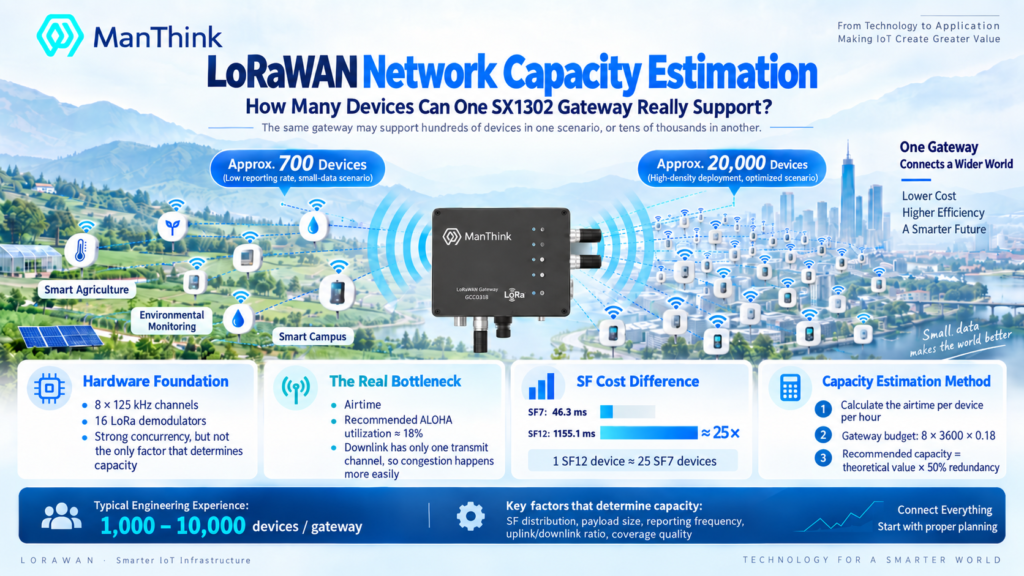
This is the first question asked at every LoRaWAN solution meeting and the first cell filled in every procurement manager’s spreadsheet. The answer is not in any product datasheet, because the same gateway in a real deployment may serve 700 devices — or 20,000. The hardware has not changed. Only the deployment conditions have.
This is not vendor exaggeration. An SX1302 gateway can indeed carry tens of thousands of sensors under a particular set of assumptions — it is just that those assumptions are almost never stated explicitly. So the same hardware honestly supports a two-orders-of-magnitude spread of deployments. The difference is not the gateway. It is mostly coverage.
This article breaks gateway capacity open: what the hardware gives you, what the ALOHA protocol takes away, which knobs you can actually turn in the field, and finally a ready-to-use estimation formula with a three-step decision flow.
1. What the Hardware Gives You
1.1 SX1302 Concentrator: 8 Channels × 16 Demodulators
Modern LoRaWAN gateways are almost universally built around the Semtech SX1302 concentrator. To talk about capacity, we first need to look inside this chip.
From Semtech’s official SX1302 datasheet:
- 8 × 125 kHz frequency channels: 8 simultaneous listening centers
-
16 LoRa demodulators, in two groups:
- 8 supporting SF5–SF12 (long-range low-rate tier)
- 8 supporting SF5–SF10 (short-range high-rate tier)
- 1 125 / 250 / 500 kHz high-bandwidth LoRa demodulator
- 1 (G)FSK demodulator (legacy compatibility)
- Up to 65 configurable logical channels
Sensitivity -141 dBm with the SX1250 RF front-end. Power consumption is roughly an order of magnitude lower than its predecessor, the SX1301.
Key insight: the 8 frequency channels and the 16 demodulators are shared, not bound one-to-one. The same frequency channel with different SFs can be decoded in parallel by different demodulators; different frequency channels with different SFs obviously can as well.
But 16 is not a large number. When the 17th packet arrives, it is silently dropped — no queueing, no retransmission request. The SX1302’s concurrency ceiling ends right here.
This is precisely where the SX1303 draws another line in the sand: enabling its Fine Timestamp feature cuts the concurrency ceiling from 16 down to 8 — see Part 8 of this series.
1.2 What “Demodulator Saturation” Looks Like in Practice
In real deployments, gateway capacity is rarely bounded by demodulators. It is bounded by airtime.
To make this intuitive, here are measured airtimes for a 13-byte payload, BW=125 kHz, CR=4/5. These are real numbers from Semtech’s official LoRa calculator, which uses Semtech’s internal RF physical model:
| SF | Airtime | Relative to SF7 |
| SF7 | 46.3 ms | 1.0× |
| SF9 | 164.9 ms | 3.6× |
| SF10 | 288.8 ms | 6.2× |
| SF11 | 577.5 ms | 12.5× |
| SF12 | 1155.1 ms | 25× |
One device at SF12 consumes as much network resource as 25 devices at SF7. The payload is identical. The only difference is how far away it is, or how bad the link is.
This is why SF distribution, not device count, is the real capacity metric in LoRaWAN engineering, and why better coverage gives you more capacity for free — not because you upgraded the hardware, but because the SF7/SF8 share of your fleet went up.
2. ALOHA: The Starting Point of Every Estimation
2.1 LoRaWAN Uplink Is an ALOHA Channel
LoRaWAN devices speak when they have something to say: no scheduling, no channel reservation, and in most regions no listen-before-talk. This makes the uplink channel an ALOHA channel at heart.
ALOHA has an unpleasant property: throughput rises with offered traffic up to a point, then falls. Not levels off — falls. Past the peak, more transmissions produce fewer successful receptions, because collisions destroy packets, devices retry, and retries create more collisions.
The peak occurs at about 18% channel utilization. Past this number, the network goes from “working” straight into “looks like device failure”.
LoRaWAN does not degrade gracefully at capacity. It works, and then it collapses. This collapse mode shows up on a monitoring dashboard as “random device dropouts” rather than “gateway full” — which is exactly why so many field engineers cannot find the bottleneck.
2.2 Capture Effect: 6 dB Saves One Packet
ALOHA is not entirely hopeless. LoRa has a Capture Effect: when two packets collide on the same channel and SF, the stronger one — about 6 dB above the other — can still be decoded.
This means a well-planned network with devices spread across a path-loss gradient outperforms the textbook model. It is also why good coverage planning equals free capacity gain — devices must be spread across a gradient for the capture effect to do its work.
But the capture effect does not change the shape of the curve, only pushes it a little to the right.
2.3 The SF Cost Curve
Translate the numbers above into “channel budget per hour” (EU868, 8 channels):
Divide that by how much airtime each device consumes per hour, and the theoretical capacity falls out. The ThinkLink knowledge base, assuming 13-byte payloads, 8-channel gateways, and hourly uplink intervals, gives the following official estimates:
| SF Tier | 13-Byte Airtime | 8-Channel Theoretical Capacity |
| SF7 | 46.3 ms | ~787,000 |
| SF9 | 164.9 ms | ~253,000 |
| SF12 | 1155.1 ms | ~29,000 |
Note: this is the theoretical ceiling, assuming zero collisions, zero retransmissions, and zero downlink. Real-world deployment capacity is typically 30–50% of the theoretical value — which is why the “hundreds of thousands per channel” claims on brochures are almost never realized in the field.
3. The Variables That Actually Decide Capacity
3.1 The Uplink / Downlink Asymmetry
The most counter-intuitive design choice in LoRaWAN is its uplink / downlink asymmetry:
- Uplink: 8 frequency channels + 16 demodulators in parallel — a multi-lane highway by design
- Downlink: typically just one transmit channel — a single-lane country road
So “downlink congestion” is the biggest hidden risk in scaling LoRaWAN, and it almost never appears in small deployments. Once you cross 1,000 devices, the downlink starts to become the bottleneck: Join Accept, ACK, MAC commands — all downlink traffic has to squeeze through this single transmit channel.
3.2 SF Distribution: The Overlooked Core Metric
Many teams assess LoRaWAN load by “device count”. This is wrong. The correct metric is the SF-weighted total airtime.
Example: a site has 1,000 devices, of which 200 are stuck at SF12. Their equivalent load is roughly 200 × 25 = 5,000 SF7 devices. The site looks “green” in a “1,000 devices” spreadsheet, but at the network layer it is already red.
If you want to know how close your network is to the ALOHA threshold, the most direct method is to look at the SF distribution histogram from the past 24 hours in your network server’s backend. More than 10% SF12 share is a yellow flag; more than 20% means it is time to do coverage optimization.
3.3 Payload Size: The Second Overlooked Variable
A 13-byte payload and a 50-byte payload at SF12 take 1155 ms and 2468 ms respectively — the 50-byte packet consumes twice as much airtime.
Many teams start by packing everything onto the wire (timestamp, device ID, sensor reading, battery voltage, signal strength, firmware version, CRC). Trimming payloads is the cheapest way to scale — cutting from 50 bytes to 13 bytes halves the airtime at the same SF, equivalent to doubling capacity.
4. Six Capacity Knobs You Can Actually Turn
These knobs are ordered from lowest cost to highest cost. Always tune the first few before spending on new hardware.
Knob 1 | Enable ADR (Adaptive Data Rate)
ADR is the built-in LoRaWAN rate adaptation mechanism. Disabling ADR is the same as halving your capacity — all devices will default to SF12, costing 25× the airtime of SF7.
With ADR enabled, the NS adjusts each device’s SF based on link budget. Over time, the SF7/SF8 share should rise significantly.
Pitfall: server-side ADR may be delayed in delivery under high downlink load, leaving devices stuck at SF12. Local ADR lets devices self-adjust based on local RSSI/SNR, which is more reliable. ManThink’s proprietary EdgeBus (EB) runtime includes local ADR out of the box.
Knob 2 | Use Confirmed Uplinks Sparingly
Every Confirmed uplink requires a downlink ACK. Downlink is a single lane.
Move non-critical data (temperature, humidity, battery voltage, periodic heartbeats) from Confirmed to Unconfirmed, and lift reliability to the application layer (retry, dedup, aggregation). This significantly reduces downlink traffic — the cheapest way to relieve the downlink bottleneck.
Knob 3 | Stagger Join Timing
“Power-on-and-join” is a classic anti-pattern. Imagine 5,000 devices, after a mass outage, all powering on at once — they will all send Join Requests within the same second, and the downlink Join Accept channel will be jammed.
The right way:
- On-demand join: trigger a join only after N consecutive failed uplinks
-
UTC-based random delay: each device uses
pseudo_random_delay = (DevAddr & 0xFF) × 100 msto spread attempts
ManThink EdgeBus’s join protection does exactly this: built-in random delay and join retry, avoiding the “join avalanche” after a large-scale power recovery.
Knob 4 | Plan Coverage and Gateway Density Right
A counter-intuitive but repeatedly verified rule of thumb:
| Deployment Scenario | Gateway Density Reference |
| Dense urban | 1–2 per km² |
| Suburban / rural | 1 per 5–10 km² |
| In-building (5–10 floor penetration) | 1–2 per building |
| Factory floor | 1 per 5,000–10,000 m² |
Too dense (3+ gateways in the same area all receiving the same packet) wastes hardware but trades for higher reception success rate; too sparse pushes devices to high SFs and crashes the network.
Knob 5 | Trim and Compress Payloads
- Send only the necessary fields at the application layer; drop redundant IDs and timestamps
- Use differential compression on large data blocks (send only the delta)
- Merge multiple small readings into a single periodic packet
-
Binary beats ASCII:
"23.5"asint16saves 2 bytes directly
Knob 6 | Use Edge Computing Instead of “Upload Everything”
Move alarm judgment, threshold filtering, and data aggregation onto the gateway or end device. Send only exceptions and summaries — this is the real killer feature for scaling LoRaWAN.
ManThink EdgeBus (EB) is designed exactly for this: run event-driven edge computing logic on low-power MCUs (Cortex-M0 is enough), making “most of the time no uplink” the norm. This elevates the capacity metric from “packets per second” to “anomalies per day” — a completely different scale.
5. A Ready-to-Use Estimation Formula
5.1 Three-Step Estimation Flow
Step 1 | Compute per-device hourly airtime
Step 2 | Compute the gateway’s hourly channel budget
Step 3 | Compute theoretical capacity, leave 50% margin
5.2 A Worked Example
A smart agriculture deployment:
- 1,000 soil-moisture sensors
- Uplink every 10 minutes
- 8-byte payload (moisture + temperature)
- With ADR enabled, estimated SF distribution: 60% SF7 / 25% SF8 / 15% SF9
Measured airtimes (8-byte, BW125, CR4/5, Semtech calculator):
- SF7 ≈ 41 ms
- SF8 ≈ 77 ms
- SF9 ≈ 164 ms
Weighted average airtime:
Per-device hourly consumption:
Theoretical single-gateway capacity:
Recommended deployment ceiling with 50% margin:
1,000 devices is comfortable under this budget. A single 8-channel SX1302 gateway is more than enough.
Contrast: if coverage is poor and all devices sit at SF12:
Same 1,000 devices — but with poor coverage, a single gateway cannot carry the load, and a second gateway (or antenna deployment optimization) is immediately necessary.
6. Capacity in Practice with ManThink GD6 / GDO51
6.1 GD6 Open-Source Gateway
The ManThink GD6 (ESP32-S3 + SX1302) is positioned for small-to-medium deployments. Typical applications:
- Single-gateway coverage of one building (3–8 floors) + 1–2 km² outdoor
- Recommended device scale: 500–3,000 devices / gateway (with ADR)
- Payload limited to 8–20 bytes
- Local ADR + Unconfirmed + join protection enabled
6.2 GDO518 Commercial Gateway
The ManThink GDO518 commercial outdoor gateway (SX1302, 16 frequency points + 32 concurrent packet demodulation):
- Recommended device scale: 5,000–20,000 devices / gateway
- Suited for large city-scale deployments (smart city, smart agriculture, asset tracking)
- Docker support for running EB edge computing on the gateway
- External SIM slot + debug serial port — no need to open the case for maintenance
A real-world case: a smart agriculture deployment in Jiangsu, China — a single GDO518 gateway carrying 8,000 soil sensors (15-minute uplink, 6-byte payload, ADR enabled), running stably for 12 months.
7. Five Common Misconceptions
Misconception 1: SX1303 equals higher capacity
Wrong. The SX1303 is pin-compatible with the SX1302 and has the same demodulator count, but enabling Fine Timestamp drops the concurrency ceiling from 16 to 8. The SX1303’s real value is geolocation accuracy, not throughput.
Misconception 2: “Connected Devices” means “Carried Devices”
Many vendors advertise “this NS has connected XX0,000 devices” — that is just the registration count, not simultaneous online capacity. Real capacity is the SF-weighted concurrent load.
Misconception 3: To scale up, just buy more gateways
Wrong. Most LoRaWAN networks can scale up 3–5× by doing just three things: enabling ADR, trimming payloads, and staggering joins. Buying more gateways is the last step, not the first.
Misconception 4: The more devices, the more you need Class C
Wrong. Class C keeps receivers always on; its current consumption is more than 1,000× that of Class A’s sleep state. Class A is the workhorse for large-scale deployments — downlink bandwidth is naturally narrow, and Class A’s “RX window only after uplink” actually matches this constraint.
Misconception 5: Every device should use Confirmed uplinks
Wrong. Temperature, humidity, battery voltage, periodic heartbeats — these re-sendable data items use Unconfirmed. Alarms and control commands use Confirmed. Downlink bandwidth is a scarce resource — don’t waste it on data that does not need delivery guarantees.
8. A Checklist to Take Away
Next time you estimate LoRaWAN deployment capacity, walk this list:
- Use the Semtech LoRa calculator to measure airtime at the target SF and payload size
- Estimate the SF-weighted average airtime, do not use SF7 or SF12 directly
- Apply the ALOHA 18% threshold + 50% margin to get the recommended device count
- Enable ADR + local ADR (EB has it built-in)
- Confirmed for critical data, Unconfirmed for the rest
- Use UTC random delay or on-demand triggers for joins
- Keep payloads small; binary beats ASCII
- Aggregate and filter at the edge; reduce uplinks
- When single-gateway capacity is tight, optimize coverage first, then consider adding gateways
9. Closing Remarks
Back to the spreadsheet cell at the top: how many devices can an SX1302 gateway handle?
If a single number is required: a typical range is 1,000 to 10,000 devices per gateway. But the number itself is meaningless — it depends on SF distribution, payload size, uplink frequency, uplink/downlink ratio, join strategy, and coverage quality.
Capacity is a designed outcome, not a purchased parameter. The hardware you buy is only the starting point of the capacity curve; SF distribution, payload governance, and coverage planning — these software-layer decisions decide whether the same hardware can carry 700 or 20,000 devices.
For large-scale LoRaWAN deployments, the only reliable scaling order is:
ADR → payload trimming → join staggering → edge computing → coverage optimization → add a gateway
Walk through these six steps, and most projects do not need a second gateway.
References
- Semtech Official LoRa Modem Calculator: https://lora-developers.semtech.com/resources/tools/calculators/lorawan-airs-time-and-duty-cycle-calculator/
- LoRa Alliance, RP002-1.0.4 LoRaWAN Regional Parameters (2020)
- LoRa Alliance, LoRaWAN L2 1.0.4 Specification (2020)
- Semtech, SX1302 Datasheet — Corecell Gateway Baseband Processor
- ThinkLink Official Knowledge Base: “Decoding LoRaWAN Gateway Capacity”, “LoRaWAN Gateway Capacity Analysis”, “How Big Is a LoRa Gateway’s Capacity”
- “How Many Devices Can One LoRaWAN Gateway Really Handle?” — lorawan-consulting.com (2024)
- Semtech, LoRa Corecell Reference Design — SX1302CFD490GW1 / SX1302CFD915W1-H
- ManThink Official Documentation: GD61x Configuration Guide / EdgeBus SDK