
ManThink has officially released the GD6 (GD61x series), an open-source indoor LoRaWAN gateway. The gateway is built around an ESP32-S3 MCU with an optional Semtech SX1301 or SX1302 concentrator, integrating Ethernet, Wi-Fi, and optional 4G multi-link backhaul. It covers major LoRaWAN regional bands worldwide — including CN470, EU868, AS923, and US915 — supports the full protocol stack (UDP Packet Forwarder, MQTT Bridge, and Basic Station), and delivers its complete web configuration system and firmware management capabilities as an open-source platform.
GD6 is positioned as a cost-effective indoor LoRaWAN gateway for developers, system integrators, and IoT solution providers. It is suitable for smart buildings, campus networks, small industrial sites, prototyping, and academic research.
Design Philosophy
Building a LoRaWAN gateway is not primarily a hardware challenge — the SX1302 + ESP32 combination is well-established. The real challenge lies in balancing “works out of the box” with “deeply customizable.”
Most commercial gateways lock their configuration systems inside closed apps or cloud backends, limiting the parameters developers can tune. Pure DIY solutions offer flexibility but lack engineered configuration workflows and reliable OTA mechanisms, making them difficult to deploy in production.
GD6 takes a different approach: the hardware is designed and manufactured to commercial standards, but the configuration system, management interfaces, and firmware upgrade mechanisms are fully open. You can unbox a GD6, connect the antenna and power, and have it online in 5 minutes through the web interface. At the same time, you can integrate it into your own operations stack via REST API and remote MQTT, or even build and flash custom firmware.
It’s a gateway that works out of the box — and can also be taken apart and modified.
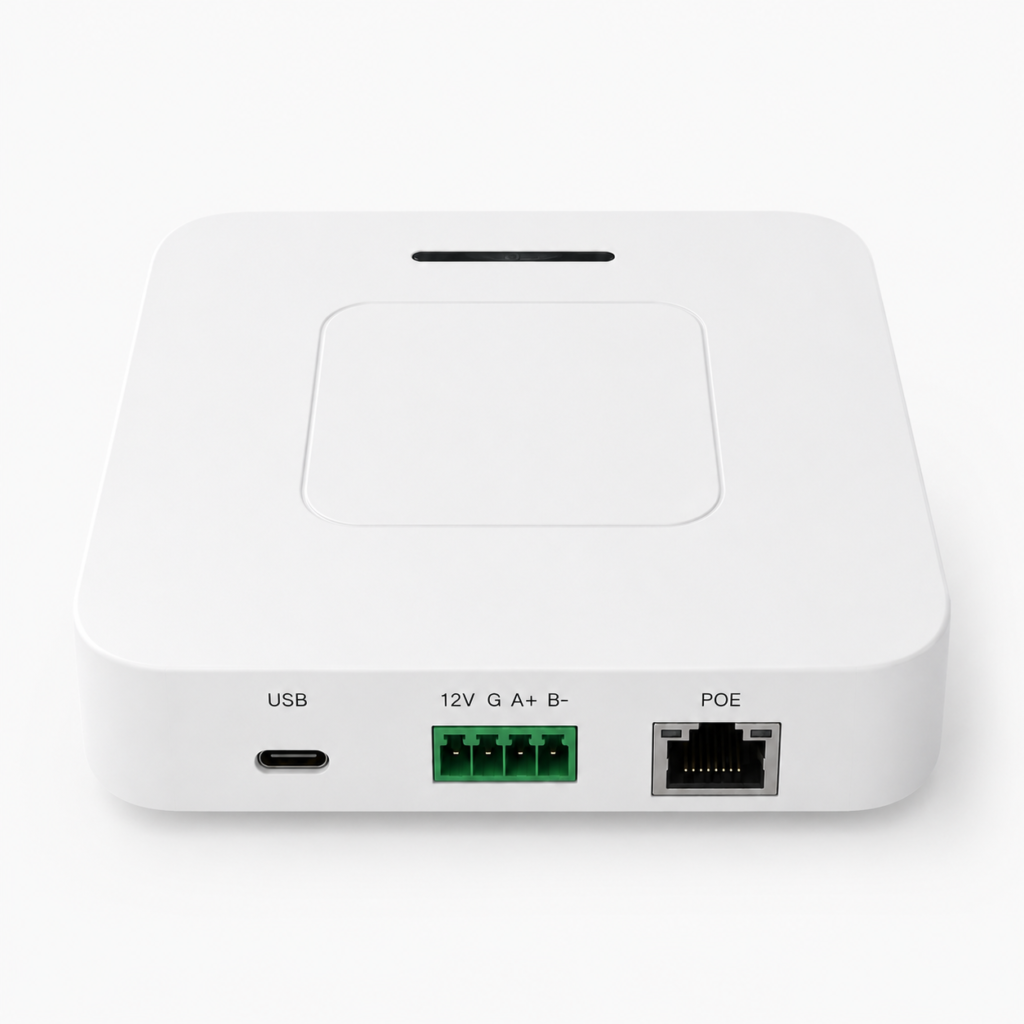
Hardware
GD6’s hardware design centers on three goals: sufficient performance, deployment flexibility, and convenient power.
MCU: ESP32-S3-WROOM-1 (N8R8)
8 MB QIO Flash + 8 MB Octal PSRAM, both running at 80 MHz. The ESP32-S3’s dual-core processor handles multi-channel LoRa transceiving while simultaneously running the web console, TLS-encrypted communication, and MQTT remote configuration. The 8 MB PSRAM ensures the gateway doesn’t drop packets or lag under high channel load.
LoRa Concentrator: SX1301 or SX1302
GD6 offers two concentrator options, identified directly by the model suffix:
- Suffix
`1`: Semtech SX1301 — the classic solution, mature and stable - Suffix
`2`: Semtech SX1302 — lower power consumption, higher sensitivity
Both use an A-type LoRa architecture: single LoRa antenna, 8 frequency channels, 65 sub-channels, half-duplex.
RF Versions: Covering Major Global Bands
| Model | RF Band | Supported Regions |
|---|---|---|
| GD614 | 400 MHz class | CN470, EU433 |
| GD618 | 800 MHz+ class | EU868, AS923 (including AS923-1~4 variants), AU915, US902 (corresponding to US915) |
The `4` and `8` in the model number indicate the RF frequency range, not the number of channels. The region code must match the RF hardware and local regulations — you cannot convert a gateway from one frequency band to another through software alone.
Backhaul: Ethernet + Wi-Fi + Optional 4G
- Ethernet: W5500, 10/100 Mbps, RJ45, supports DHCP or static IP
- Wi-Fi: ESP32-S3 integrated 2.4 GHz, supports AP + STA concurrently
- 4G (optional): LTE Cat 1, miniPCIe interface, module is swappable for different carrier bands
Ethernet is the default priority link; when the primary link fails, the gateway automatically switches to the backup. Models with 4G (indicated by `G` in the model number) have triple-link backhaul; models without 4G (indicated by `N`) have dual-link.
The Wi-Fi AP mode operates independently of the backhaul link, providing a local configuration and recovery entry point. The default hotspot SSID is `LGW-Config`, password `lgw12345678`, management address `192.168.4.1`.
Power Supply: Three Options
- Type-C 5V: convenient for desktop debugging
- DC terminal 5–24V: wide-voltage input for industrial sites
- PoE (AG configuration only): power and data over a single RJ45 cable
Connecting multiple power sources simultaneously is not recommended.
Protocol Support
GD6 supports three mainstream uplink protocols, covering virtually all LoRaWAN network servers:
Semtech UDP Packet Forwarder— The classic protocol with the broadest compatibility. Configure the server address, uplink/downlink ports, and timeout parameters to connect.
MQTT Bridge — Forwards LoRa data via MQTT, supporting mutual TLS, CA certificates, and client certificates. Suitable for enterprise deployments with data security requirements. The MQTT Bridge uses an independent connection that does not interfere with the remote configuration channel.
Basic Station — Semtech’s recommended next-generation gateway protocol, supporting LNS direct connection or CUPS bootstrap. Authentication options include TLS + Token or mTLS (client certificates). Compatible with TTN/TTI, ChirpStack, and other major network servers.
All three protocols are switched from the “LNS Configuration” page in the web console. Switching the uplink driver triggers a gateway reboot — confirm no OTA or configuration write is in progress before switching.
Open Source: What’s Open
GD6’s firmware and web configuration system are open-sourced on GitHub: **[github.com/ManThink/gd6-open](https://github.com/ManThink/gd6-open)**.
The open-source design spans several layers:
Complete Web Configuration System A bilingual (Chinese/English) web console covering network backhaul, LoRaWAN server, RF parameters, system logs, firmware upgrades, file system management, and user management. All configuration items are exposed via REST API for programmatic management.
Independent Remote MQTT Configuration Channel Through a dedicated MQTT connection, you can remotely read and write permitted configuration items and trigger reboots without physical device access. This channel is completely independent from the data-forwarding MQTT Bridge, using separate connections and credentials. To prevent lockout from remote misconfiguration, the remote channel cannot modify its own Broker settings. Suitable for large-scale gateway operations.
A/B Dual-Partition OTA GD6 uses an A/B dual firmware partition design. During upgrades, new firmware is written to the inactive partition, verified, and then the boot partition is switched. Even if an upgrade is interrupted or fails, the device boots from the original partition — no bricking. Firmware `.bin` files can be built independently and flashed via the web interface.
Accessible File System Configuration files under `/spiffs` can be viewed and managed from the web console. Configuration JSON takes effect after reboot, supporting deep customization. Note: the `web/` directory’s static files should not be modified carelessly — overwriting them may render the console inaccessible, and a factory reset will not restore them.
Configuration Workflow
From power-on to online, the process typically takes under 5 minutes:
- Power up: Connect the LoRa antenna (antenna must be connected before power-on), then power via Type-C or DC terminal
-
Connect to the gateway
- Via Ethernet: find the gateway address in your router’s DHCP list, open it in a browser
- Via Wi-Fi: connect to the
`LGW-Config`hotspot, navigate to`http://192.168.4.1`
-
Log in: use the default password
`wifi!0804`, then change it immediately in User Management - Configure backhaul: set up network connection on the “Ethernet” or “Wi-Fi” page
- Configure LNS: select the uplink protocol on the “LNS Configuration” page, enter the network server address and port
- Set frequency band: confirm the region and sub-band on the “Frequency & RF” page, apply, and restart the LoRa service
No serial cable needed, no command line required. If a configuration error makes the web console inaccessible, the REC button performs a factory reset — hold for 2 seconds, the device resets and reboots. Network and LoRaWAN configurations are restored to defaults; the written Gateway EUI is preserved.
Application Scenarios
Smart Buildings & Campuses GD6’s indoor design and Wi-Fi backhaul suit office buildings and industrial parks. A single gateway can cover one floor of LoRaWAN devices — temperature/humidity monitoring, personnel positioning, energy management. Ethernet provides stable backhaul; Wi-Fi serves as backup.
Small Industrial Sites The 5–24V wide-voltage power input adapts to industrial power conditions. Models with 4G can deploy in warehouses and workshops without wired network infrastructure, using 4G as primary or backup link. The miniPCIe 4G module is swappable for local carrier bands.
Development & Prototyping The ESP32-S3’s performance and open-source configuration system make GD6 suitable as a LoRaWAN development platform. Developers can manage gateways in bulk via REST API, customize configurations through the file system, and quickly set up test environments to verify device communication.
Education & Research Universities and research institutions can use GD6 to build LoRaWAN lab environments. Students can explore gateway internals through the web console and file system rather than facing a closed black-box device.
Multi-Region Global Deployment GD614 and GD618 cover major global frequency bands, and the 4G module is swappable by region — suitable for cross-regional project deployment. The region code in the model number clearly identifies the supported LoRaWAN regional parameters.
Technical Specifications
| Category | Specification |
|---|---|
| MCU | ESP32-S3-WROOM-1 N8R8 |
| Flash | 8 MB QIO, 80 MHz |
| PSRAM | 8 MB Octal, 80 MHz |
| LoRa Concentrator | Semtech SX1301 or SX1302 (model suffix) |
| LoRa Architecture | Type A: single antenna, 8 channels, 65 sub-channels, half-duplex |
| Regional Support | CN470, EU433, EU868, AS923 (1~4), AU915, US902 |
| Ethernet | W5500, 10/100 Mbps, RJ45 |
| Wi-Fi | 2.4 GHz, AP + STA |
| 4G (optional) | LTE Cat 1, miniPCIe, swappable module |
| Uplink Protocols | Semtech UDP, MQTT Bridge, Basic Station (LNS/CUPS) |
| Power Supply | Type-C 5V / DC 5–24V / PoE (AG config) |
| OTA | A/B dual-partition |
| Management | Web console (CN/EN), REST API, Remote MQTT |
| Security | TLS certificates, Token auth, Password login |
| Config Storage | SPIFFS, power-loss persistent |
| Mounting | Desktop or wall-mount via rotating bracket |
Model Numbering
GD6 model format: `GD61{4|8}-A{N|G}-{Region}-{Version}-{1|2}`:
| Segment | Meaning | Options |
|---|---|---|
`GD614` / `GD618` | RF frequency band | 4 = 400 MHz class (CN470/EU433); 8 = 800 MHz+ class (EU868/AS923/AU915/US902) |
`AN` / `AG` | 4G & PoE | N = Not included; G = Includes 4G module and PoE |
| Region code | LoRaWAN region | CN470 / EU433 / EU868 / AS923 / AU915 / US902 |
| Version code | Version type | N = Default version |
`1` / `2` | Concentrator chip | 1 = SX1301; 2 = SX1302 |
Example: `GD618-AG-AS923-N-2` = 800 MHz+ RF, with 4G and PoE, AS923 region, default version, SX1302 concentrator.
Integration with ThinkLink Platform
GD6 is the native gateway hardware for the ThinkLink IoT platform. When used with ThinkLink, you can register gateways with one click and auto-sync Gateway EUI, visually manage devices, thing models, and automation rules through the platform, remotely push configurations without on-site visits, and monitor gateway status and backhaul links in real time.
At the same time, GD6’s full protocol stack support means you’re free to connect to any third-party LoRaWAN network server — TTN/TTI, ChirpStack, LoRiot, or a self-hosted LNS are all compatible.
Learn More
- GD6 Open-Source Repository (firmware + web config): [github.com/ManThink/gd6-open](https://github.com/ManThink/gd6-open)
- GD61x Specifications & User Guide: [think-link.net/docs/zh/Device/LoRaWANGateway/gd61x-user-guide](https://www.think-link.net/docs/zh/Device/LoRaWANGateway/gd61x-user-guide)
- GD6 Configuration Guide: [think-link.net/docs/zh/Device/LoRaWANGateway/gd6-configuration-guide](https://www.think-link.net/docs/zh/Device/LoRaWANGateway/gd6-configuration-guide)
- ThinkLink Platform Website: [www.think-link.net](https://www.think-link.net)
- ManThink Website: [www.manthink.cn](https://www.manthink.cn)